Tempo and transport
SDK 1.xWritten for core 1.53+ and gui 1.23+.
Goal: An app that PLAY and STOP on the transport bar drive, that counts the beat on pads 1 to 4 at the instrument’s tempo, that sets that tempo with a Tap button, and that gives the transport back when it closes.
You need: Start here done, with the PC simulator built or a board you have flashed once. The crosspad-examples clone. Hello screen first, if you have not built an app yet. For PLAY and STOP you need the board.
What you will build
Section titled “What you will build”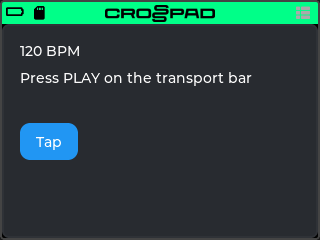
A screen with three lines and a Tap button. The app claims the CrossPad’s one transport, so PLAY and STOP on the transport bar (the strip of keys at the top of the board’s screen) reach it. While it plays, pads 1 to 4 light one after another, one pad per beat: the second line counts Beat 1 to Beat 4. The first line shows the instrument’s tempo, the Tap button sets it, and the third line shows the last TempoChanged event the app received. The app makes no sound and registers no pad logic, so while it is open the pads keep playing the kit; it only colours pads 1 to 4. The code is in examples/07-tempo-transport in crosspad-examples, which is not public yet.
The beat is the app’s own count: it starts when the app sees PLAY and runs at the tempo, but it is not locked to the Sequencer’s clock.
Run it on the simulator
Section titled “Run it on the simulator”In the simulator you try opening and closing the app, and Tap; the third line stays empty there. PLAY, STOP, the beat count and TempoChanged need the CrossPad (Simulator vs CrossPad).
Copy the example into your simulator checkout. Run this from your crosspad-examples clone.
Terminal window python3 tools/install.py --target pc ~/crosspad-pc tempo-transportTerminal window python tools\install.py --target pc C:\crosspad-pc tempo-transportYou should see:
installed example-tempo-transport -> …/src/apps/crosspad-example-tempo-transport.Rebuild the simulator. The build looks for apps while CMake configures, so configure again before you build.
cmake -B buildreuses the settings of your first build, which CMake keeps inbuild/.Terminal window cd ~/crosspad-pccmake -B buildcmake --build buildIn the x64 Native Tools Command Prompt, as in step 4 of the Windows tab of PC simulator:
Terminal window cd /d C:\crosspad-pccmake -B buildcmake --build buildYou should see: a line starting
-- App submodule: crosspad-example-tempo-transportwhile CMake configures, and a build that ends withouterror.If not: a new app does not show up.
Start the simulator, from the same folder.
Terminal window ./bin/CrossPadTerminal window bin\CrossPad.exeYou should see: the CrossPad window with the launcher, and a tile labelled TempoTransport among the apps.
Click the TempoTransport tile.
The tile may show the name shortened.
You should see: the screen in the picture above: the tempo (120 BPM on a fresh start; with an SD card folder set, the tempo the simulator last saved), Press PLAY on the transport bar and the Tap button. Pads 1 to 4 in the window turn dim amber.
-
Click Tap four times at a steady pace, about 0.4 seconds apart.
You should see: the first line follows your taps (taps 0.4 seconds apart give 150 BPM). Wait more than two seconds and the next tap starts a new count. Two seconds after your last tap the app commits the tempo, so a song open in the simulator’s Song app (with an SD card folder set) takes it too and is saved.
-
Close the app with the power button (Space or Ctrl). If the encoder is on a widget, the first press releases it and the second closes the app.
You should see: the launcher, and pads 1 to 4 back in their usual colours. Open the app again: it starts clean, with Press PLAY on the transport bar, and keeps the tempo you tapped, because that tempo belongs to the instrument, not to the app.
Run it on the CrossPad
Section titled “Run it on the CrossPad”Step 1 runs from your crosspad-examples clone. The steps after it run in the firmware project (~/CrossPad, Windows C:\CrossPad\firmware) in a terminal with ESP-IDF loaded, as in 2. Build the firmware. Used the one-line installer? Use crosspad-idf in place of idf.py.
Copy the example into the firmware project.
Terminal window python3 tools/install.py --target idf ~/CrossPad tempo-transportTerminal window python tools\install.py --target idf C:\CrossPad\firmware tempo-transportYou should see:
installed example-tempo-transport -> …/components/crosspad-example-tempo-transport.Clean the build folder and build. The firmware looks for apps only when it configures from scratch, hence the
fullclean. The lines are for a v2 board (PCB r20).Terminal window cd ~/CrossPadidf.py -B build_v2 fullcleanidf.py -B build_v2 -DSDKCONFIG=sdkconfig.v2 buildTerminal window cd C:\CrossPad\firmwareidf.py -B build_v2 fullcleanidf.py -B build_v2 "-DSDKCONFIG=sdkconfig.v2" buildFor a v1 board (PCB r16 / r19), use
build_v1in both commands andsdkconfig.v1in the second.You should see:
Generated app_registry_init.cpp with N apps: …;TempoTransport;…while CMake configures, andProject build complete. To flash, run:at the end.If not: build stops before Project build complete. If the build completes but
TempoTransportis not in the list: a new app does not show up.Flash the firmware, then the assets, which hold the app's icon and go to the board separately. Answer the board as in 3. Flash the board: Allow, then Update, then leave it alone for 10 seconds.
Terminal window python3 tools/ota_flash.pypython3 tools/fs_transfer.py assetsTerminal window python tools\ota_flash.pypython tools\fs_transfer.py assetsYou should see:
OTA complete!from the first command andAssets written and verified. The device is restarting.from the second.If not: OTA flash cannot find the board, or OTA times out waiting for confirmation.
Open the app. On the board, hit pad 1 on the MODE map to open the Sampler. Then, with the board on USB, start the app with the crosspad-hil command-line tool, from the venv you made in 1. Set up the toolchain. Used the one-line installer? Skip the first line:
crosspad-hilalready works.Terminal window . ~/CrossPad/.venv/bin/activatecrosspad-hil app start TempoTransportTerminal window C:\CrossPad\firmware\.venv\Scripts\Activate.ps1crosspad-hil app start TempoTransportYou should see:
running=TempoTransportin the terminal.If not: the command needs the board in MIDI + Serial mode: run
crosspad-hil usb-mode set default, press Allow on the board, and start the app again.unknown app: the firmware on the board has no app of that name;crosspad-hil app listlists the ones it has, and step 2's configure line shows whether the build found it. No board found: OTA flash cannot find the board.You should see: the tempo, Press PLAY on the transport bar and the Tap button under the transport bar; pads 1 to 4 dim amber. On the bar, PLAY can be pressed and the BPM key shows the tempo; STOP is dimmed while nothing plays, and the record and overdub keys stay dimmed, because this app cannot record. If the Sequencer was playing a pattern, it stops: opening this app takes the transport from it.
-
Tap PLAY on the transport bar.
You should see: Beat 1, Beat 2, Beat 3, Beat 4, round again, and pads 1 to 4 lighting bright amber one after another in time with it, the other three dim.
-
Tap STOP on the transport bar.
You should see: Press PLAY on the transport bar again and all four pads dim.
-
Tap the app’s Tap button a few times at a steady pace.
You should see: the first line and the bar’s BPM key follow your taps, the Sequencer and its click play at the new tempo, and the third line reads Last change: with it. If a computer is sending MIDI clock to the CrossPad, the third line reads The host’s MIDI clock sets the tempo instead, and Tap only shows the message Tempo follows the host’s MIDI clock.
-
Leave the app (the power button, or MODE and another app). If the encoder is on the bar or the Tap button, the first press of the power button releases it and the second closes the app.
You should see: pads 1 to 4 back in their usual colours and PLAY on the bar dimmed: nothing holds the transport until another app claims it. To play the pattern again, open the Sequencer.
Test it on your computer
Section titled “Test it on your computer”TempoModel.hpp (the tap-tempo arithmetic, the smallest transport target and the beat count) has a host test, tests/test_tempo_transport.cpp: plain C++ and Catch2, no board and no LVGL.
The test build needs a crosspad-core checkout: your simulator clone has one in lib/crosspad-core. The first configure downloads Catch2. Run it from your crosspad-examples clone.
cmake -S tests -B tests/build -G Ninja -DCROSSPAD_CORE_DIR="$(cd ~/crosspad-pc/lib/crosspad-core && pwd)"cmake --build tests/buildctest --test-dir tests/build -R tempo-transport --output-on-failureIn the x64 Native Tools Command Prompt, after cd /d to your crosspad-examples folder:
cmake -S tests -B tests\build -G Ninja -DCROSSPAD_CORE_DIR=C:\crosspad-pc\lib\crosspad-corecmake --build tests\buildctest --test-dir tests\build -R tempo-transport --output-on-failureYou should see: 100% tests passed, 0 tests failed out of 8. The build compiles the tests of every example in the clone; -R tempo-transport runs only this recipe's.
How it works
Section titled “How it works”The app is two source files: a plain C++ header with the parts a host test can check (the tap-tempo arithmetic, the transport target, the beat count), and the app itself. The folder also holds the manifest, the CMakeLists, the icon and the host test, which Test it on your computer runs.
Each function runs on one task, and the variables two tasks share are atomics:
| Code | Runs on | Writes | Shared with another task? |
|---|---|---|---|
| create, destroy | LVGL task | every s_ variable (resets, widgets, s_sub, s_timer) | no: the event task and the timer are not running yet, or no longer |
tick (the timer) | LVGL task | the labels, pads 1 to 4, s_playStartMs, s_wasPlaying, s_shownBeat; commits the taps | reads s_lastChange and the target’s flag, both atomics |
on_tap (the Tap button) | LVGL task | s_tap, s_commitPending, the tempo | no |
on_tempo (TempoChanged) | event task | s_lastChange | yes: an atomic |
state() | LVGL task (the bar’s repaint) | nothing | reads the target’s flag |
play(), stop() | LVGL task for the bar’s keys; stop() from whatever task another app claims on | the target’s flag | yes: an atomic inside the target |
The state
Section titled “The state”ClockBlink s_target; // what PLAY and STOP reach while we hold the claimexample_tempo::TapTempo s_tap; // the taps so farstd::atomic<float> s_lastChange{0.0f}; // the last TempoChanged, written on the event taskbool s_commitPending = false; // tapped a tempo that is not committed yetcrosspad::SubscriptionHandle s_sub = nullptr; // our TempoChanged subscriptionlv_timer_t* s_timer = nullptr; // paints the labels and the padslv_group_t* s_group = nullptr; // what the encoder walkslv_obj_t* s_bpm = nullptr;lv_obj_t* s_beat = nullptr;lv_obj_t* s_from = nullptr;uint32_t s_playStartMs = 0; // when this PLAY beganbool s_wasPlaying = false;int s_shownBeat = -2; // -2: nothing painted yet, -1: stoppedSource: examples/07-tempo-transport/src/TempoTransportApp.cpp, lines 37–49 (repository opens soon)
Everything the app keeps is a file-scope variable, and file-scope variables keep their values from the last visit, so create resets every one of them before it builds anything (What outlives the screen). s_lastChange is the one plain file-scope variable the event task writes, so it is a std::atomic; the target guards its own flag. s_commitPending says the taps have set a tempo that is not committed yet. s_shownBeat starts at -2, a value the timer never computes, so the first tick always paints.
Helpers
Section titled “Helpers”uint32_t now_ms() { return static_cast<uint32_t>(crosspad::getClock().getTimeUs() / 1000); }
// Another app's claim stops our target and takes PLAY: this screen is then idle.bool holds_transport() { return crosspad::transportTarget() == &s_target; }
// Lights pad @p beat (0..3) and dims the others; -1 dims all four.void light_beat(int beat){ auto& pads = crosspad::getPadManager(); for (uint8_t p = 0; p < 4; ++p) { if (p == beat) pads.setPadColor(p, 255, 200, 40); else pads.setPadColor(p, 30, 22, 4); }}Source: examples/07-tempo-transport/src/TempoTransportApp.cpp, lines 53–66 (repository opens soon)
now_ms() reads the platform clock, getClock().getTimeUs(), which runs the same way on the board and in the simulator. holds_transport() asks transportTarget() who has the transport now, instead of remembering that the app claimed it: a claim can be taken away. light_beat() colours pads 1 to 4 with setPadColor from getPadManager() (pads are indexes 0 to 15 in code); the app has no pad logic, so PadManager keeps playing the kit underneath.
The transport target
Section titled “The transport target”class BlinkTarget : public crosspad::ITransportTarget {public: void play() override { playing_.store(true); } void stop() override { playing_.store(false); } crosspad::TransportState state() const override { return playing_.load() ? crosspad::TransportState::Playing : crosspad::TransportState::Stopped; } const char* name() const override { return "BLINK"; }
private: // The bar reads it on the LVGL task; stop() can come from another task when // another app claims the transport. An atomic keeps state() cheap and safe. std::atomic<bool> playing_{false};};Source: examples/07-tempo-transport/include/example-tempo-transport/TempoModel.hpp, lines 45–60 (repository opens soon)
An ITransportTarget is what PLAY and STOP reach. Three methods are required: play, stop and state; everything else has a default. The default caps is play and stop, which is why the bar dims its record and overdub keys for this target. state() is called on the LVGL task every time the bar repaints. The transport promises nothing about the thread stop() comes from: another app’s claim stops the previous holder on whatever task that app claims from. So the flag is an atomic: cheap to read and safe across tasks. The class lives in the header without LVGL, so the host test checks that it plays, stops and reports its caps.
Reporting the clock’s tempo
Section titled “Reporting the clock’s tempo”// 0 from bpm() means "no tempo of its own": the bar would show "--" and grey// out its BPM key. The beat runs on the clock's tempo, so report that.struct ClockBlink : example_tempo::BlinkTarget { float bpm() const override { return crosspad::transportTempo(); }};Source: examples/07-tempo-transport/src/TempoTransportApp.cpp, lines 29–33 (repository opens soon)
The bar asks the target for its tempo with bpm. The default, 0, means “no tempo of its own”: the bar then shows -- and greys out its BPM key, so the player could not change the tempo while this app holds the transport. The beat runs at the instrument’s tempo, so the app reports transportTempo(), and the BPM key stays editable. The model’s BlinkTarget stays pure, and the app adds the one method that needs the running instrument.
Listening for tempo changes
Section titled “Listening for tempo changes”// Runs on the event task, and the data lives only during this call:// copy what you need somewhere the LVGL task can read it.void on_tempo(const void* data, crosspad::EventType, void*){ s_lastChange.store(static_cast<const crosspad::TempoChangedData*>(data)->bpm);}Source: examples/07-tempo-transport/src/TempoTransportApp.cpp, lines 70–75 (repository opens soon)
Create subscribes this function to TempoChanged (EventType) with subscribe and keeps the handle in s_sub (see Create below). The handler runs on the event task, not the LVGL task, and the TempoChangedData it receives is valid only during the call. So it copies the one number it needs into an atomic and touches no widget; the timer below puts it on screen. On the board, the firmware’s MIDI clock posts TempoChanged when the tempo or its source changes, and about once a second while a host’s clock drives it. Nothing posts it in the simulator.
Tap tempo
Section titled “Tap tempo”void on_tap(lv_event_t*){ if (crosspad::transportTempoFromHost()) { // a host's MIDI clock would undo the edit ui_toast_show("Tempo follows the host's MIDI clock"); return; } const float bpm = s_tap.tap(now_ms()); if (bpm <= 0.0f) return; // the first tap only starts the count crosspad::transportSetTempo(bpm); // heard at once s_commitPending = true; // committed once, when the taps stop crosspad_gui::transportbar_refresh();}
// Once per series of taps: a commit re-measures and saves an open song,// so the app commits once, when the taps stop.void commit_taps(){ if (!s_commitPending) return; s_commitPending = false; if (!crosspad::transportTempoFromHost()) crosspad::transportCommitTempo();}Source: examples/07-tempo-transport/src/TempoTransportApp.cpp, lines 79–99 (repository opens soon)
Tap is an LVGL button, so on_tap runs on the LVGL task. It checks transportTempoFromHost() first: while a computer’s MIDI clock drives the tempo, an edit would be undone at the clock’s next tick, so the app says so with ui_toast_show, in the words the bar’s own BPM key uses. Otherwise transportSetTempo changes the Sequencer and its click at once, clamped to kTransportTempoMin and kTransportTempoMax (20 to 300 BPM), and the app notes that a commit is due.
transportCommitTempo says the edit is finished, and only then does an open song take the tempo: its worker re-measures the song and saves it. That takes a moment, and the song takes one edit at a time, so the app commits once per edit, not on every tap. commit_taps() commits once, when the series of taps is over: the timer calls it two seconds after the last tap, and destroy calls it in case the app closes sooner. It checks the host’s clock again, because a clock that took over since the taps would undo the tempo anyway.
TapTempo itself is plain arithmetic in the header: the average of the last four intervals, with a new count after a pause of more than two seconds, and seriesEnded() for that pause. The host test checks those rules.
The timer
Section titled “The timer”void tick(lv_timer_t*){ if (s_tap.seriesEnded(now_ms())) commit_taps(); // two seconds without a tap const float bpm = crosspad::transportTempo(); if (bpm > 0.0f) lv_label_set_text_fmt(s_bpm, "%d BPM", static_cast<int>(bpm + 0.5f)); else lv_label_set_text(s_bpm, "No tempo yet");
const float last = s_lastChange.load(); if (crosspad::transportTempoFromHost()) { lv_label_set_text(s_from, "The host's MIDI clock sets the tempo"); } else if (last > 0.0f) { lv_label_set_text_fmt(s_from, "Last change: %d BPM", static_cast<int>(last + 0.5f)); } else { lv_label_set_text(s_from, ""); }
const bool ours = holds_transport(); const bool playing = ours && s_target.state() == crosspad::TransportState::Playing; if (playing && !s_wasPlaying) s_playStartMs = now_ms(); s_wasPlaying = playing; const int kElsewhere = -3; // another app has the transport int beat = kElsewhere; if (ours) beat = playing ? example_tempo::beatAt(now_ms() - s_playStartMs, bpm) : -1; if (beat == s_shownBeat) return; s_shownBeat = beat; if (beat == kElsewhere) { lv_label_set_text(s_beat, "Another app has the transport"); for (uint8_t p = 0; p < 4; ++p) crosspad::getPadManager().clearPadColor(p); return; } light_beat(beat); if (beat >= 0) lv_label_set_text_fmt(s_beat, "Beat %d", beat + 1); else lv_label_set_text(s_beat, "Press PLAY on the transport bar");}Source: examples/07-tempo-transport/src/TempoTransportApp.cpp, lines 103–136 (repository opens soon)
Create starts this with lv_timer_create, so it runs on the LVGL task, about 30 times a second, and is the only code that writes to the screen. First it commits the taps once they have stopped. Then it reads everything other tasks write: the tempo, the atomic from the event handler, whether a host’s clock drives the tempo, and who holds the transport. The beat counts from the first tick that sees the target playing. The pads are repainted only when the beat changes (s_shownBeat), not on every tick. When another app holds the transport, the screen says so and gives pads 1 to 4 back with clearPadColor, once. Nothing re-claims while the app stays open: open it again to get PLAY back. With one app on screen at a time this is rare, because an app that claims in its create closes this one first; the check keeps the screen honest when anything else claims.
Create
Section titled “Create”lv_obj_t* TempoTransport_create(lv_obj_t* parent, App*){ // Every static starts clean on each visit. s_target.stop(); s_tap = example_tempo::TapTempo{}; s_lastChange.store(0.0f); s_commitPending = false; s_sub = nullptr; s_timer = nullptr; s_group = nullptr; s_bpm = s_beat = s_from = nullptr; s_playStartMs = 0; s_wasPlaying = false; s_shownBeat = -2; // paint on the first tick
if (lv_indev_t* enc = crosspad_gui::getGuiPlatform().getNavigationEncoder()) { s_group = lv_group_create(); lv_indev_set_group(enc, s_group); }
lv_obj_t* root = lv_obj_create(parent); lv_obj_set_size(root, LV_PCT(100), LV_PCT(100)); lv_obj_set_flex_flow(root, LV_FLEX_FLOW_COLUMN); lv_obj_set_style_pad_row(root, 10, 0); s_bpm = lv_label_create(root); s_beat = lv_label_create(root); s_from = lv_label_create(root); lv_label_set_text(s_from, "");
lv_obj_t* tap = lv_button_create(root); lv_obj_add_event_cb(tap, on_tap, LV_EVENT_CLICKED, nullptr); lv_obj_t* l = lv_label_create(tap); lv_label_set_text(l, "Tap"); if (s_group) lv_group_add_obj(s_group, tap);
// From now on PLAY means this app. A claim outlives the screen on purpose // (the Sequencer keeps playing when you leave it); this target has nothing // to play without its screen, so destroy stops and releases it. crosspad::transportClaim(&s_target); crosspad_gui::transportbar_refresh();
s_sub = crosspad::getEventBus().subscribe(crosspad::EventType::TempoChanged, on_tempo, nullptr); s_timer = lv_timer_create(tick, 33, nullptr); return root;}Source: examples/07-tempo-transport/src/TempoTransportApp.cpp, lines 142–186 (repository opens soon)
Create runs on the LVGL task, in this order:
- Resets. Every file-scope variable goes back to its start value, because statics keep their values from the last visit (What outlives the screen).
s_target.stop()clears the playing flag a last visit may have left. - The encoder group and the widgets. A group for the encoder if the platform has one, a column of three labels, and the Tap button with
on_tapon it. - The claim.
transportClaimmakes PLAY and STOP mean this app, and stops the previous holder first if it is running: one transport, one thing sounding. That is why opening the app stops a playing Sequencer pattern. A claim outlives the app’s screen on purpose (the Sequencer keeps playing when you leave it), but this target has nothing to show without its screen, so destroy gives it back.transportbar_refreshrepaints the bar now instead of on its next tick; like everytransportbar_*function it must run on the LVGL task. - The subscription and the timer, last, once every label they write exists:
subscribeforTempoChanged, andlv_timer_create(tick, 33, nullptr).
Destroy undoes these in the reverse order.
Destroy
Section titled “Destroy”void TempoTransport_destroy(lv_obj_t* root){ // root is null when the app's screen was already wiped: free what is ours, delete nothing. if (s_timer) { lv_timer_delete(s_timer); s_timer = nullptr; } if (s_sub) { crosspad::getEventBus().unsubscribe(s_sub); s_sub = nullptr; } commit_taps(); // taps from the last two seconds still reach the song s_target.stop(); crosspad::transportRelease(&s_target); // a no-op if another app has claimed since crosspad_gui::transportbar_refresh(); for (uint8_t p = 0; p < 4; ++p) crosspad::getPadManager().clearPadColor(p); if (s_group) { lv_group_delete_deferred(s_group); s_group = nullptr; } s_bpm = s_beat = s_from = nullptr; if (root) lv_obj_delete_async(root);}Source: examples/07-tempo-transport/src/TempoTransportApp.cpp, lines 190–203 (repository opens soon)
The order matters. The timer goes first, so no tick runs against labels that are about to be deleted. The subscription goes next (unsubscribe), so the event task stops writing for a screen that is gone. Taps from the last two seconds are committed, so leaving right after tapping does not leave the song at its old tempo. Then the target stops and transportRelease gives the transport back: release does not stop anything by itself, and it does nothing if another app has claimed since, so it never takes PLAY from someone else. The bar is repainted, pads 1 to 4 get their usual colours back, the encoder group is deleted with lv_group_delete_deferred, and the root is deleted last, only if there is one.
Pitfalls
Section titled “Pitfalls”- A claim you never release outlives your target. The transport keeps a plain pointer to whatever claimed it and calls
state()on it at every bar repaint. This example’s target is a file-scope object, so it never goes away; a target you allocate in create and free in destroy withouttransportReleaseleaves the bar calling a freed object on its next repaint. Release before the target goes. - Releasing does not stop.
transportReleaseonly gives the transport back. A target that plays something (a sequencer, a loop) and is released while playing keeps playing, with no PLAY or STOP that reaches it any more. Stop it first, as destroy does. bpm()left at 0 locks the tempo. With the default, the bar shows--and greys out its BPM key for as long as the app holds the transport. Return the tempo your target plays at; for a target that follows the instrument, that istransportTempo().- LVGL or the event’s data in the event handler. The
TempoChangedhandler runs on the event task. A label set there touches LVGL from the wrong task, and a pointer to the event’s data kept for later points at memory that is no longer valid. Copy the value into an atomic and let the timer draw it. - Setting the tempo without a commit, or committing too often.
transportSetTempoalone moves the Sequencer but leaves an open song at its old tempo, so the Sequencer and the song show two numbers. A commit re-measures and saves the song, and stops a song that is playing, so commit once per edit. A control that changes the tempo in a run of steps (an encoder turn, a series of taps) sets on every step and commits once, when the run ends, as Tap does. - Editing the tempo under a host’s clock. While
transportTempoFromHost()is true, the next clock tick undoes the edit, and a commit would still have re-measured and saved an open song for nothing. Check it first and tell the player, as Tap does. - Assuming the transport stays yours. Another claim stops your target and takes PLAY. An app that keeps saying Press PLAY after that sends the player to a key that now drives someone else. Compare
transportTarget()with your target before you show transport state. - Claiming stops what is playing.
transportClaim(&target)stops the previous holder if it runs. That is right for a new thing to play; the second argument,false, hands over without stopping, and is meant for two targets that drive the same playback (a song and the view of one of its tracks), not for leaving someone else’s pattern running under your PLAY. - Statics from the last visit. Without the resets at the top of create, a second visit starts with the old beat, the old taps and the old widget pointers. Create resets them all; destroy sets the widget pointers back to null.
- Motion and vibration: gestures from the event task and the motion sensor from a timer, the same thread rules as
TempoChangedhere. - How an app works: what outlives the screen, the transport claim among it.
- Transport.hpp: every transport and tempo function, and the full
ITransportTarget. - The example’s folder (
examples/07-tempo-transportin crosspad-examples, which is not public yet), with its host test.