UI kit
SDK 1.xWritten for core 1.53+ and gui 1.23.1+.
Goal: an app screen that looks like the rest of the CrossPad, talks to the player with toasts and a confirm dialog, has an overlay the power button closes first, and counts pad hits that arrive on another task without touching LVGL from there.
You need: Start here done, or the PC simulator built; the examples cloned as in Where the examples live; and the Hello screen recipe, which introduces the encoder group, the back handler and destroy. This example needs crosspad-gui >=1.23.1, one patch release above the >=1.23.0 the other examples ask for, and its crosspad-app.json says so. The reason is the pixel font behind CP_FONT_PIXEL: 1.23.1 declares it with C linkage, which the simulator on Windows needs.
What you will build
Section titled “What you will build”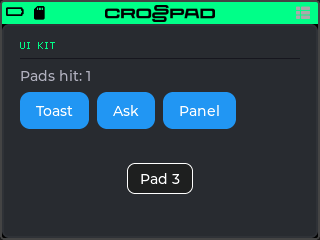
A screen titled UI KIT with a pad counter and three buttons. Toast shows a short “Saved” message. Ask opens a “Reset counter?” dialog. Panel opens an overlay inside the app that the power button closes before it closes the app. Every pad you hit shows a toast with the pad’s number and adds one to Pads hit. The app does not take the pads: the Sampler keeps playing them, and the app listens to what it plays.
The app’s code is one source file, src/UiKitApp.cpp in examples/10-ui-kit in crosspad-examples, which is not public yet, plus a small header with the parts a host test can check (Test it on your computer).
Run it on the simulator
Section titled “Run it on the simulator”Copy the example into your simulator checkout. Run this from your crosspad-examples clone.
Terminal window python3 tools/install.py --target pc ~/crosspad-pc ui-kitTerminal window python tools\install.py --target pc C:\crosspad-pc ui-kitYou should see:
installed example-ui-kit -> …/src/apps/crosspad-example-ui-kit.Rebuild the simulator. The build looks for apps while CMake configures, so configure again before you build.
cmake -B buildreuses the settings of your first build, which CMake keeps inbuild/.Terminal window cd ~/crosspad-pccmake -B buildcmake --build buildIn the x64 Native Tools Command Prompt, as in step 4 of the Windows tab of PC simulator:
Terminal window cd /d C:\crosspad-pccmake -B buildcmake --build buildYou should see: a line starting
-- App submodule: crosspad-example-ui-kitwhile CMake configures, and a build that ends withouterror.If not: a new app does not show up.
Start the simulator, from the same folder.
Terminal window ./bin/CrossPadTerminal window bin\CrossPad.exeYou should see: the CrossPad window with the launcher, and a tile labelled UiKit among the apps.
Click the UiKit tile.
You should see: UI KIT in the theme colour, a thin rule under it,
Pads hit: 0, and the buttons Toast, Ask and Panel.-
Click pad 3 with the mouse. The keyboard plays the pads only after you switch the round keyboard button on the simulator window from OFF to FOCUS; pad 3 is then the C key.
You should see: a toast
Pad 3near the bottom of the screen for under a second, andPads hit: 1. -
Click Toast, then Ask.
You should see: a green
Savedtoast; then a dialogReset counter?with Reset and Cancel. Reset sets the counter back toPads hit: 0; Cancel, or the power button (Space or Ctrl in the simulator), closes it and keeps the count. -
Click Panel, then press the power button (Space or Ctrl) twice.
You should see: the panel
An overlay inside the app.covers the app; the first press closes the panel and the app stays open; the second closes the app. -
Open UiKit again, click Ask, and with the dialog still up press Escape (the simulator’s “go home” key).
You should see: the launcher, with no dialog left over it, and the mouse wheel moving the launcher’s focus. The focus starts on the first tile. Closing the app with the dialog open is the case Destroy is ordered for.
Everything in this recipe works on the simulator. Pads you hit there sound the kit only if the simulator has one to play; the toast and the count do not depend on it.
Run it on the CrossPad
Section titled “Run it on the CrossPad”Step 1 runs from your crosspad-examples clone. The steps after it run in the firmware project (~/CrossPad, Windows C:\CrossPad\firmware) in a terminal with ESP-IDF loaded, as in 2. Build the firmware. Used the one-line installer? Use crosspad-idf in place of idf.py.
Copy the example into the firmware project.
Terminal window python3 tools/install.py --target idf ~/CrossPad ui-kitTerminal window python tools\install.py --target idf C:\CrossPad\firmware ui-kitYou should see:
installed example-ui-kit -> …/components/crosspad-example-ui-kit.Clean the build folder and build. The firmware looks for apps only when it configures from scratch, hence the
fullclean. The lines are for a v2 board (PCB r20).Terminal window cd ~/CrossPadidf.py -B build_v2 fullcleanidf.py -B build_v2 -DSDKCONFIG=sdkconfig.v2 buildTerminal window cd C:\CrossPad\firmwareidf.py -B build_v2 fullcleanidf.py -B build_v2 "-DSDKCONFIG=sdkconfig.v2" buildFor a v1 board (PCB r16 / r19), use
build_v1in both commands andsdkconfig.v1in the second.You should see:
Generated app_registry_init.cpp with N apps: …;UiKit;…while CMake configures, andProject build complete. To flash, run:at the end.If not: build stops before Project build complete. If the build completes but
UiKitis not in the list: a new app does not show up.Flash the firmware, then the assets, which hold the app's icon and go to the board separately. Answer the board as in 3. Flash the board: Allow, then Update, then leave it alone for 10 seconds.
Terminal window python3 tools/ota_flash.pypython3 tools/fs_transfer.py assetsTerminal window python tools\ota_flash.pypython tools\fs_transfer.py assetsYou should see:
OTA complete!from the first command andAssets written and verified. The device is restarting.from the second.If not: OTA flash cannot find the board, or OTA times out waiting for confirmation.
Open the app. On the board, hit pad 1 on the MODE map to open the Sampler. Then, with the board on USB, start the app with the crosspad-hil command-line tool, from the venv you made in 1. Set up the toolchain. Used the one-line installer? Skip the first line:
crosspad-hilalready works.Terminal window . ~/CrossPad/.venv/bin/activatecrosspad-hil app start UiKitTerminal window C:\CrossPad\firmware\.venv\Scripts\Activate.ps1crosspad-hil app start UiKitYou should see:
running=UiKitin the terminal.If not: the command needs the board in MIDI + Serial mode: run
crosspad-hil usb-mode set default, press Allow on the board, and start the app again.unknown app: the firmware on the board has no app of that name;crosspad-hil app listlists the ones it has, and step 2's configure line shows whether the build found it. No board found: OTA flash cannot find the board.You should see: the same screen as in the simulator, under the transport bar. Turning the encoder walks Toast, Ask and Panel, and the transport bar’s keys too.
-
Hit pad 3.
You should see: the Sampler plays the kit’s pad 3 as always, a toast
Pad 3appears, and the count goes up by one. A running loop counts too: every step it plays on a pad shows its toast. -
Close the app with a short press of the power button (twice if a dialog or the panel is open).
You should see: the MODE map again.
Test it on your computer
Section titled “Test it on your computer”UiModel.hpp has the two things that need no screen: the toast text, which counts pads from 1, and a pad index that survives the trip through void*. Its host test is tests/test_ui_kit.cpp: plain C++ and Catch2, no board and no LVGL.
The test build needs a crosspad-core checkout: your simulator clone has one in lib/crosspad-core. The first configure downloads Catch2. Run it from your crosspad-examples clone.
cmake -S tests -B tests/build -G Ninja -DCROSSPAD_CORE_DIR="$(cd ~/crosspad-pc/lib/crosspad-core && pwd)"cmake --build tests/buildctest --test-dir tests/build -R ui-kit --output-on-failureIn the x64 Native Tools Command Prompt, after cd /d to your crosspad-examples folder:
cmake -S tests -B tests\build -G Ninja -DCROSSPAD_CORE_DIR=C:\crosspad-pc\lib\crosspad-corecmake --build tests\buildctest --test-dir tests\build -R ui-kit --output-on-failureYou should see: 100% tests passed, 0 tests failed out of 2. The build compiles the tests of every example in the clone; -R ui-kit runs only this recipe's.
How it works
Section titled “How it works”The whole app is in src/UiKitApp.cpp. This page takes create first, then the functions it connects to buttons and events, then destroy.
The headers
Section titled “The headers”The file opens with the same headers as Hello screen (the App class for each target, the registration macro, the GUI platform and helpers, LVGL, the app’s own model). These are the ones this recipe adds:
#include "crosspad-gui/design/cp_design.h"#include "crosspad-gui/theme/crosspad_theme.h"#include "crosspad-gui/components/ui_toast.h"#include "crosspad-gui/components/ui_modal.h"#include "crosspad-gui/components/power_gesture.h"#include "crosspad/event/IEventBus.hpp"#include "crosspad/event/EventData.hpp"#include <atomic>Source: examples/10-ui-kit/src/UiKitApp.cpp, lines 13–20 (repository opens soon)
lv_obj_t* s_count = nullptr; // "Pads hit: N"lv_obj_t* s_row = nullptr; // the row of buttonslv_obj_t* s_panel = nullptr; // the overlay, hidden until askedlv_group_t* s_group = nullptr; // what the encoder walkslv_obj_t* s_dialog = nullptr; // the confirm dialog while it is opencrosspad::SubscriptionHandle s_sub = nullptr; // our SamplePlayback subscriptionuint32_t s_backToken = 0; // the panel's place on the back stack, 0 = nonestd::atomic<bool> s_alive{false}; // false once the app is closingint s_pads = 0; // pad hits counted since the last resetSource: examples/10-ui-kit/src/UiKitApp.cpp, lines 31–39 (repository opens soon)
All state lives in file-scope variables, and create sets every one of them back first, because they keep their values from the last visit (What outlives the screen). s_alive is the only one another task reads, so it is the only atomic; everything else is touched on the LVGL task alone.
Create
Section titled “Create”lv_obj_t* UiKit_create(lv_obj_t* parent, App*){ // Every static starts clean on each visit. s_count = s_row = s_panel = nullptr; s_group = nullptr; s_dialog = nullptr; s_sub = nullptr; s_backToken = 0; s_pads = 0; s_alive.store(true);
if (lv_indev_t* enc = crosspad_gui::getGuiPlatform().getNavigationEncoder()) { s_group = lv_group_create(); lv_indev_set_group(enc, s_group); }
lv_obj_t* root = lv_obj_create(parent); lv_obj_set_size(root, LV_PCT(100), LV_PCT(100)); lv_obj_remove_flag(root, LV_OBJ_FLAG_SCROLLABLE); lv_obj_set_flex_flow(root, LV_FLEX_FLOW_COLUMN); lv_obj_set_style_pad_row(root, 8, 0);Source: examples/10-ui-kit/src/UiKitApp.cpp, lines 131–151 (repository opens soon)
Create resets every file-scope variable and sets s_alive to true, then makes the encoder group, only when getNavigationEncoder() returns an encoder, and points the encoder at it. The root fills the app area and lays its children out in a column. Hello screen explains each of these lines.
CrossPad’s look
Section titled “CrossPad’s look”// The pixel face is ASCII only: text that comes from the card (kit and// file names) stays on lv_font_montserrat_*.lv_obj_t* title = lv_label_create(root);lv_obj_set_style_text_font(title, CP_FONT_PIXEL, 0);lv_obj_set_style_text_color(title, CROSSPAD_THEME_PRIMARY, 0); // the theme's colourlv_label_set_text(title, "UI KIT");
lv_obj_t* rule = lv_obj_create(root);lv_obj_remove_style_all(rule);lv_obj_set_size(rule, LV_PCT(100), 1);lv_obj_set_style_bg_opa(rule, LV_OPA_COVER, 0);lv_obj_set_style_bg_color(rule, CP_COL_HAIRLINE, 0);
s_count = lv_label_create(root);lv_obj_set_style_text_color(s_count, CP_COL_NORMAL, 0);Source: examples/10-ui-kit/src/UiKitApp.cpp, lines 155–169 (repository opens soon)
CP_FONT_PIXEL, CP_COL_HAIRLINE and CP_COL_NORMAL come from cp_design, the design language the firmware’s own screens use. The pixel font covers ASCII only (0x20 to 0x7E): a kit or file name from the card can hold accented letters, which it would draw as boxes, so such text stays on LVGL’s lv_font_montserrat_*. The accent colour is not in cp_design on purpose: CROSSPAD_THEME_PRIMARY (from crosspad-gui/theme/crosspad_theme.h) is the theme colour the player picks in Settings, read when create runs, so your heading matches the rest of the device.
The buttons, the panel and the subscription
Section titled “The buttons, the panel and the subscription”show_count();
s_row = lv_obj_create(root);lv_obj_remove_style_all(s_row);lv_obj_set_size(s_row, LV_PCT(100), LV_SIZE_CONTENT);lv_obj_set_flex_flow(s_row, LV_FLEX_FLOW_ROW);lv_obj_set_style_pad_column(s_row, 8, 0);add_button(s_row, "Toast", on_toast);add_button(s_row, "Ask", on_ask);add_button(s_row, "Panel", on_panel);
s_panel = lv_obj_create(parent); // over the whole app, hidden until askedlv_obj_set_size(s_panel, LV_PCT(100), LV_PCT(100));lv_obj_set_style_bg_opa(s_panel, LV_OPA_COVER, 0);lv_obj_set_style_pad_all(s_panel, 16, 0);lv_obj_t* note = lv_label_create(s_panel);lv_label_set_text(note, "An overlay inside the app.\n\nThe power button closes it first.");lv_obj_set_hidden(s_panel, true);
// No pad logic of our own: the Sampler keeps playing the pads and posts each hit.s_sub = crosspad::getEventBus().subscribe(crosspad::EventType::SamplePlayback, on_pad, nullptr);return root;Source: examples/10-ui-kit/src/UiKitApp.cpp, lines 172–194 (repository opens soon)
add_button is the one from Hello screen: it creates the button, connects its click callback and adds it to s_group when there is one. The panel is created on parent, next to the app’s root rather than inside it, so it covers the whole app area without joining the root’s column layout; it starts hidden. Deleting the root does not delete it, so destroy deletes it itself.
The last call subscribes on_pad to SamplePlayback events with subscribe and keeps the handle in s_sub for destroy. The app registers no pad logic, so the Sampler keeps the pads and posts an event for every pad it plays; Pad hits from the event task shows what on_pad does with them.
Small helpers
Section titled “Small helpers”void show_count() { lv_label_set_text_fmt(s_count, "Pads hit: %d", s_pads); }
// A hidden panel does not stop the encoder: it still clicks whatever is// focused behind it. A disabled button is skipped and ignores its click, so// the buttons are disabled while the panel is up.void show_panel(bool show){ lv_obj_set_hidden(s_panel, !show); for (uint32_t i = 0; i < lv_obj_get_child_count(s_row); ++i) lv_obj_set_state(lv_obj_get_child(s_row, i), LV_STATE_DISABLED, show);}Source: examples/10-ui-kit/src/UiKitApp.cpp, lines 43–53 (repository opens soon)
lv_obj_set_hidden shows and hides the panel, but covering the buttons does not take them away from the encoder: its click goes to whatever is focused in its group, seen or not (in LVGL 9.3 even a hidden object still gets it). Disabling the buttons while the panel is up takes them out of the encoder’s walk and makes them ignore a click, so the overlay is modal for the encoder as well as for the eye.
Pad hits from the event task
Section titled “Pad hits from the event task”// On the LVGL task, when the queue reaches it. s_alive is false once the app// is closing, so a hit that was queued before the close does nothing.void show_pad(void* p){ if (!s_alive.load()) return; ui_toast_show(example_ui::padToast(example_ui::unpackPad(p)).c_str(), 800, UI_TOAST_INFO); ++s_pads; show_count();}
// On the event task: no LVGL here. Hand the pad over to the LVGL task.// These are the pads the Sampler plays (from a finger or a running sequence).void on_pad(const void* data, crosspad::EventType, void*){ const auto* d = static_cast<const crosspad::SamplePlaybackData*>(data); if (!d->isOn || d->note >= 16 || d->source != crosspad::EventSource::App) return; crosspad_gui::getGuiPlatform().postToGui(show_pad, example_ui::packPad(d->note));}Source: examples/10-ui-kit/src/UiKitApp.cpp, lines 57–74 (repository opens soon)
on_pad is an event bus subscriber, so it does not run on the LVGL task (Threads). On the firmware it runs on the crosspad_events task of the board’s event bus (EspEventBus, built on ESP-IDF’s esp_event); the simulator’s event bus is a different implementation, with a dispatch task of its own. It touches no LVGL. It packs the pad index into the void* and hands show_pad to the LVGL task with crosspad_gui::getGuiPlatform().postToGui. Packing the index (stored plus one, so pad 0 is not a null pointer) means nothing is allocated and nothing has to be freed if the call never runs. The event’s data is valid only while the subscriber runs, which is another reason to copy the one byte out.
postToGui is for other tasks like this one: an event bus subscriber or a worker task of your own. A pad callback, in an app that owns the pads, does not post: it writes atomics, and an lv_timer on the LVGL task reads them, as in Pads and LEDs. Never block a pad callback on the LVGL lock.
show_pad runs later, when the LVGL task reaches the queue. By then the app may have closed, so it returns at once when s_alive is false. Then it shows the toast with ui_toast_show: one toast at a time, at the bottom of the screen, above every app; a new one replaces the one showing.
Why SamplePlayback. The Sampler plays the pads, and for every pad it plays it posts a SamplePlayback event (SamplePlaybackData) with source EventSource::App. The filter keeps only those:
isOn: hits, not releases;note < 16: pads, not the Sampler’s preview channel;- source
App: the request to play a pad. The sample engine posts its ownSamplePlaybackevents with sourceSamplePlaybackwhen a voice starts and stops; counting those as well would count each hit twice.
So the counter shows what the Sampler plays, which is not exactly “fingers on pads”. Steps of a running loop are counted, because the Sampler plays them. With the Sampler’s 16 LEVELS on, the event names the pad being spread over all 16, so the toast shows that pad, not the one under your finger. And while an app’s own pad logic has the pads, the Sampler plays nothing and posts nothing: this pattern is for an app that leaves the pads to the Sampler.
A confirm dialog
Section titled “A confirm dialog”void on_confirm(bool yes, void*){ s_dialog = nullptr; // the last moment the dialog is alive if (!yes || !s_alive.load()) return; s_pads = 0; show_count();}
void on_ask(lv_event_t*){ // The dialog takes the encoder and gives it back to s_group when it closes. s_dialog = ui_modal_confirm("Reset counter?", "The pad counter goes back to zero.", "Reset", "Cancel", on_confirm, nullptr, s_group);}Source: examples/10-ui-kit/src/UiKitApp.cpp, lines 80–93 (repository opens soon)
ui_modal_confirm draws the dialog on the overlay layer, over the app, and moves the encoder to the dialog’s own buttons. The last argument is the group to give the encoder back when the dialog closes; this app passes its own s_group. The dialog also registers on the power button’s back stack, so a click of the power button cancels it: the callback gets false, as it does for Cancel.
The callback is the last moment the dialog exists, so on_confirm clears s_dialog there; from then on, nothing may use that pointer. It also checks s_alive: destroy closes an open dialog too (see Destroy), and a dialog closed while the app is going away must not touch the counter.
An overlay on the back stack
Section titled “An overlay on the back stack”// An overlay registers on the back stack while it is up: the power button's// click asks the newest overlay first, and only when none takes it does the// click reach the app.bool on_panel_back(void*){ if (!s_panel) return false; show_panel(false); crosspad_gui::ui_back_remove(s_backToken); s_backToken = 0; return true; // used up: the app stays open}
void on_panel(lv_event_t*){ if (!s_backToken) s_backToken = crosspad_gui::ui_back_push(on_panel_back, nullptr); if (!s_backToken) return; // the back stack is full: no way to close it, so do not open show_panel(true);}Source: examples/10-ui-kit/src/UiKitApp.cpp, lines 97–114 (repository opens soon)
A short click of the power button asks, in order: an open dropdown, then the handlers registered with crosspad_gui::ui_back_push, newest first, then the encoder’s edit mode, the quick-settings drawer, the transport bar’s focus, and only then the app (Lifecycle). Registering the panel there, instead of in a setOnBack handler, means the click closes the panel even while the encoder is on the transport bar, and the panel takes its turn with dialogs, newest first. The handler returns true to say the click is used up, and removes its own registration with ui_back_remove.
ui_back_push returns 0 when the back stack is full. A panel opened without a registration has no way to close: it has no button of its own, and the next power click would close the whole app. So on_panel does not open it at all without a token.
Destroy
Section titled “Destroy”void UiKit_destroy(lv_obj_t* root){ // root is null when the app's screen was already wiped: free what is ours, delete nothing. s_alive.store(false); // a show_pad() still queued will see this if (s_sub) { crosspad::getEventBus().unsubscribe(s_sub); s_sub = nullptr; } // An open dialog hands the encoder back to s_group: close it before s_group goes. if (s_dialog) ui_modal_confirm_dismiss(s_dialog, false); crosspad_gui::ui_back_remove(s_backToken); // a panel left open leaves no handler behind s_backToken = 0; ui_toast_dismiss(); if (s_group) { lv_group_delete_deferred(s_group); s_group = nullptr; } if (root && s_panel) lv_obj_delete_async(s_panel); s_panel = nullptr; s_row = nullptr; s_count = nullptr; if (root) lv_obj_delete_async(root);}Source: examples/10-ui-kit/src/UiKitApp.cpp, lines 199–215 (repository opens soon)
The order is the point of this function:
s_alivegoes false first, so ashow_padstill in the queue does nothing.unsubscribe, so no new pad hits are posted.- An open dialog is closed with
ui_modal_confirm_dismissbefore the group goes. Closing hands the encoder back tos_group; once the group is deleted, that would be a dangling pointer. - The panel’s back registration is removed (
ui_back_remove(0)is safe), so the power button no longer calls into a closed app. ui_toast_dismiss: the toast lives on the overlay layer and would otherwise stay over the next screen until its timer ends.- The group goes with
lv_group_delete_deferred, because the encoder may be reading it right now. The framework then gives the encoder back to the group it had before the app opened. - The panel, which is not inside the root, is deleted on its own; the root goes last, with
lv_obj_delete_async.
When root is null the app’s screen was already wiped by someone else: destroy frees what is its own and deletes no object.
REGISTER_APP(UiKit, …) at the end of the file (REGISTER_APP) makes it an app named UiKit with no pad logic of its own, which is why the Sampler keeps the pads.
Pitfalls
Section titled “Pitfalls”These are the rules the example follows.
| Rule | What goes wrong if you break it |
|---|---|
No LVGL in an event subscriber or pad callback. From a subscriber or a worker task, hand the work over with postToGui; from a pad callback, write atomics that an lv_timer reads | LVGL state gets out of step, now and then, far from your code. Never use lv_async_call from another task either. |
| Check an atomic “alive” flag first in everything you post | A hit that arrives as you leave the app runs show_pad after destroy and writes to a label that no longer exists. |
Dismiss an open ui_modal_confirm dialog in destroy, before deleting the group you gave it | The dialog stays up over the next screen and, when it closes, hands the encoder a deleted group, and the encoder stops responding. |
| Disable what a hidden or covered part of your screen holds | The encoder still clicks the buttons behind your overlay. |
Open an overlay only when ui_back_push returned a token, and ui_back_remove it when it closes and in destroy | Without a token, the power button closes the app instead of the overlay. A registration left behind keeps being asked after the app has closed. |
Subscribe to SamplePlayback, source App, to follow the pads the Sampler plays | The count misses the hits the Sampler plays. Without the source filter, a hit that sounds is counted twice. |
CP_FONT_PIXEL for fixed ASCII labels only | Kit or file names with accented letters draw as boxes. |
| Reset every file-scope variable at the top of create | The second visit starts with the last visit’s count, a stale dialog pointer or a stale back token. |
| Delete objects you created outside the root yourself | The panel lives on parent, not in the root, so deleting the root leaves it behind. |
Reuse map
Section titled “Reuse map”The four patterns of this recipe, for when you come back to copy one:
| Pattern | Call | File-scope state | In destroy |
|---|---|---|---|
| Toast | ui_toast_show(text, ms, type) | none | ui_toast_dismiss() |
| Confirm dialog | ui_modal_confirm(…, cb, user, s_group); clear the pointer in cb | s_dialog | if (s_dialog) ui_modal_confirm_dismiss(s_dialog, false); before the group goes |
| Overlay on the back stack | crosspad_gui::ui_back_push(handler, user); open only with a token; ui_back_remove when it closes | s_backToken, the panel | crosspad_gui::ui_back_remove(s_backToken);, and delete the panel if it is not in the root |
| Screen update from another task | crosspad_gui::getGuiPlatform().postToGui(fn, packed) from a subscriber; fn checks the flag first | std::atomic<bool> s_alive, the subscription handle | s_alive.store(false) first, then unsubscribe |
- How an app works: the lifecycle, the tasks and the memory rules this recipe leans on.
- The APIs used here:
ui_toast,ui_modal,power_gesture,cp_design,IGuiPlatform. - When your app is ready for others: Publish an app.
- The example’s folder (
examples/10-ui-kitin crosspad-examples, which is not public yet), with its host test.